Patient Data Security: 10 Essentials for Clinics
How do you keep patient data safe in a medical practice? 10 practical steps on passwords, access levels, backups, audit logs and secure software.

Patient data security means only authorised people can access records, information is never lost or tampered with, and it can be recovered if a system fails. Medical information is among the most sensitive data anyone has, and protecting it is part of the trust patients place in a practice.
10 essentials for every practice
- Give everyone their own user account: a password shared between receptionists means nobody is accountable.
- Strong passwords, changed regularly: don't write passwords on a note next to the monitor.
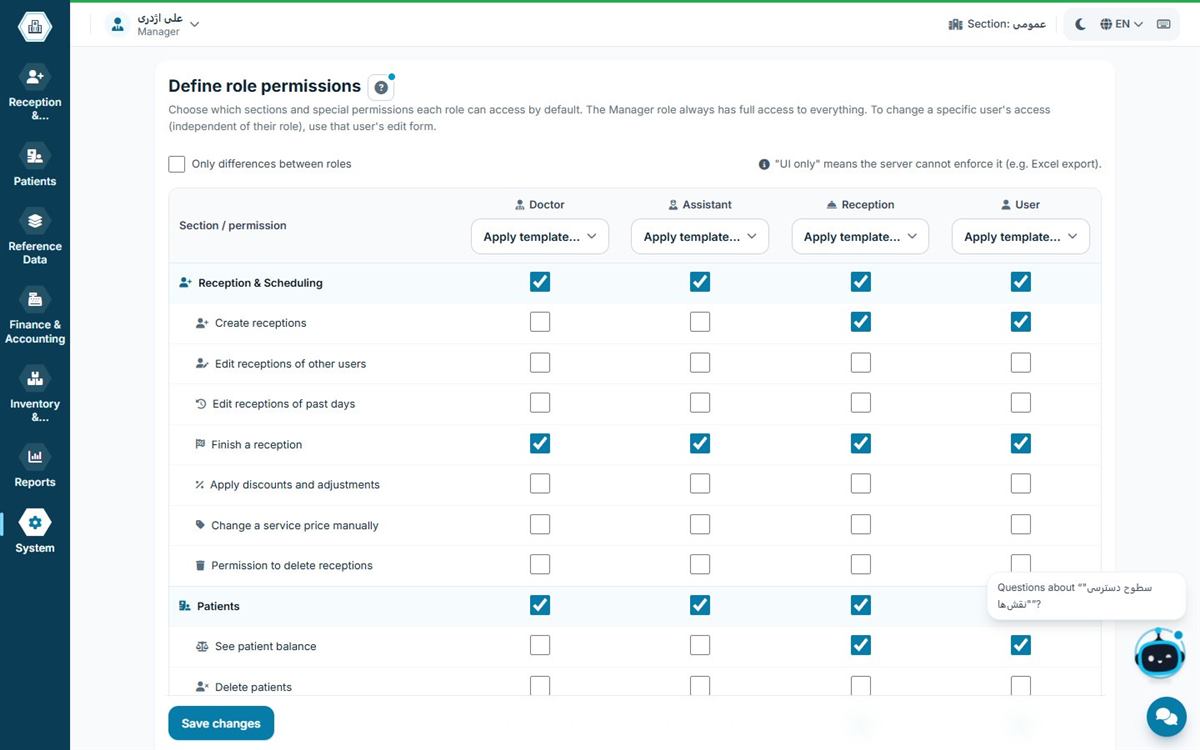
- Access levels: receptionists don't need financial reports and accountants don't need medical records.
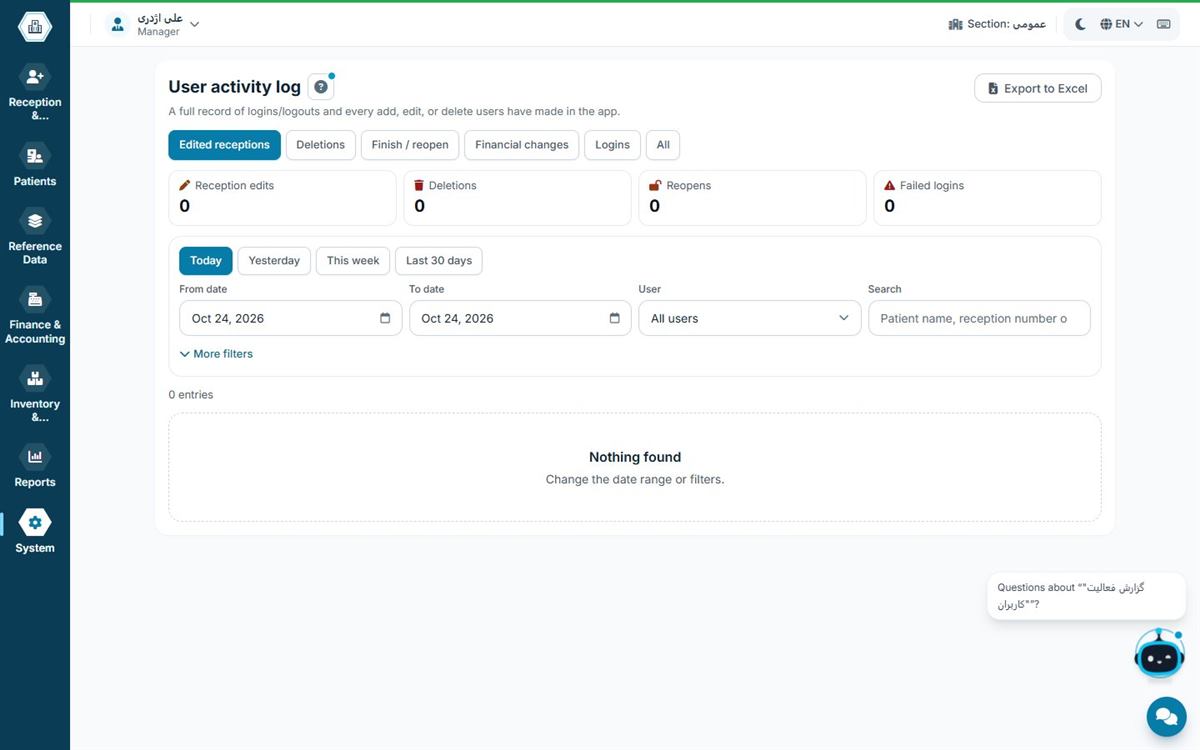
- Audit logs: the software should record who changed or deleted what, and when.
- Automatic backups: scheduled daily backups, not "whenever we remember".
- A backup copy outside the main computer: keep one copy on a separate disk or another computer.
- Test restores: check from time to time that a backup can actually be restored.
- Automatic screen lock: when the receptionist leaves the desk, the screen shouldn't stay open.
- Keep Windows and antivirus up to date: many attacks start from unpatched systems.
- Restrict unrelated software: only install what is needed on reception computers.
What role does clinic software play?
Many of these measures depend on the software: separate users, access levels, audit logs and automatic backups must be built into the software itself. Where data is stored also matters; with offline software data stays on the practice's server, while with cloud software it sits on the vendor's servers. Read the full comparison in offline vs cloud clinic software.
Which data is sensitive?
In a medical practice, almost all patient information is sensitive: name and ID number, phone number, diagnoses, medications, results and images, and even the patient's financial status and outstanding balance. Disclosing any of these can harm the patient and destroy their trust in the practice. So security is not just about medical records; patient lists and financial reports must be protected too.
Common ways data leaks from a practice
- Shared passwords: everyone logs in with the same user and nobody knows who saw or changed what.
- An open screen at the front desk: the next patient sees the previous patient's details on the monitor.
- Uncontrolled exports: patient lists passed around on USB sticks or personal messaging apps.
- Outdated computers: malware gets in through a system that hasn't been updated in years.
- Password notes: a password stuck on paper beside the monitor.
If a data breach happens
- Change user passwords immediately and cut off any suspicious access.
- Use the user activity log to see what information was viewed or exported, and when.
- Disconnect the infected computer from the network.
- If data was damaged, restore from the last clean backup.
- Review your procedures so it doesn't happen again.
Staff training: the most important security layer
Most security incidents in a practice start with human error, not a sophisticated attack. A short training session for receptionists and staff on passwords, screen locking, not sharing files and caution with unknown attachments is more effective than any expensive tool. Repeat it for every new team member.
The 3-2-1 backup plan for a practice
A simple, well-known rule: three copies of your data, on two different types of storage, with one of them outside the main computer or outside the practice. In practice this means the database on the server computer, an automatic daily backup on a second disk, and a periodic copy on an external drive kept in a safe place. Test-restore one of the backups from time to time; a backup that can't be restored is not a backup.
Monthly security checklist for your practice
- Review the user list and disable old accounts
- Scan the user activity log for anything unusual
- Confirm automatic backups are running and test one restore
- Update Windows and antivirus on every computer
- Review role permissions after any staff changes
- Give staff a short reminder about passwords and screen locks
Security in Hamyarteb
Hamyarteb gives each user their own access level, logs every change and runs scheduled database backups on the practice's computer. Patient data stays on the practice's own server and the licence is protected with a digital signature. When choosing software, also see the 12-point checklist.
See also: electronic patient records software.
Frequently asked questions
What is the most important security measure for a practice?
A separate user for each person with the right access level, together with automatic backups.
How often should we back up?
At least daily and automatically, with one copy outside the main computer.
Where is patient data stored in Hamyarteb?
On the practice's own server, not on the internet.
How does a user activity log help?
It shows who viewed or changed which information and when; it deters misuse and makes investigating an incident possible.
Where should backups be kept?
One copy on the server computer and at least one on a separate disk or computer, outside the main system.