Medical Receptionist Duties: A Daily Checklist
A medical receptionist's duties: a daily checklist from check-in to closing the cash box, key skills and software tips for shorter queues.

What are a medical receptionist's duties? The receptionist is the first and last person a patient sees. Check-in, appointments, payments, phone calls and coordination with the doctor all sit with them. Every second saved at the front desk means a shorter queue and a happier patient.
Daily duties of a medical receptionist
- Start of day: review today's appointments, prepare the waiting list and open the shift cash box.
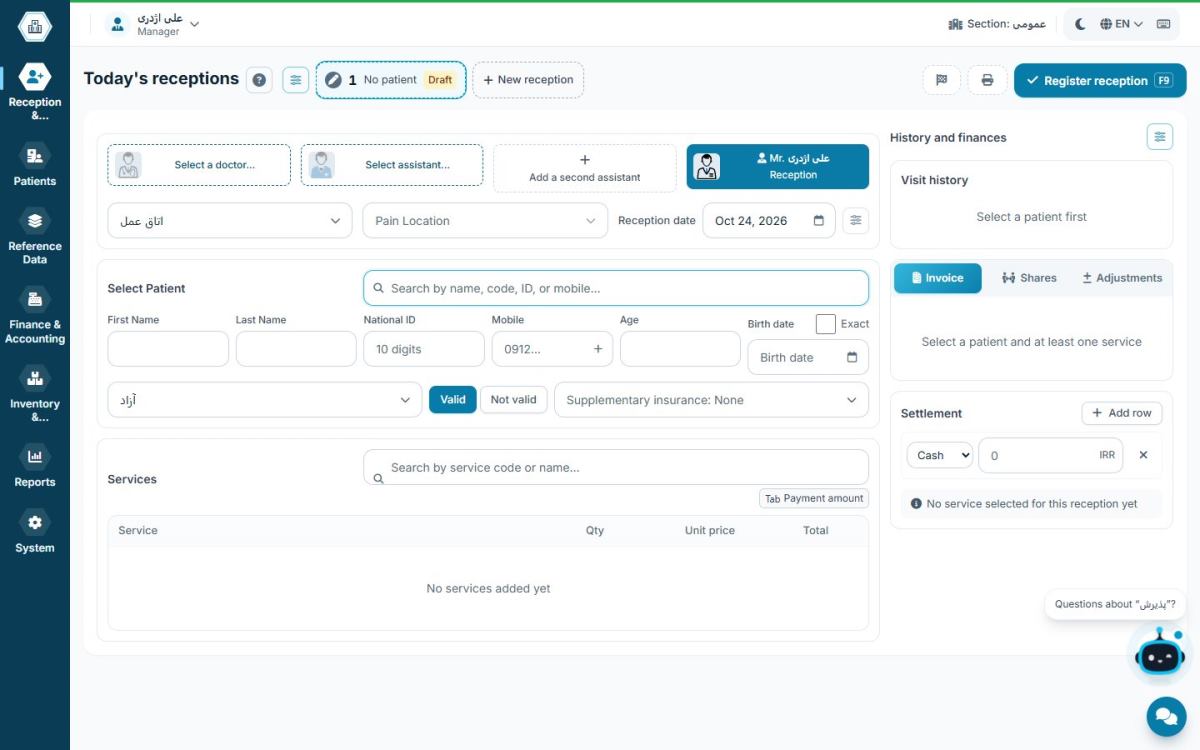
- Check-in: find the patient, register or update their details, choose the service, take payment and issue a receipt.
- Queue management: coordinate with the doctor, keep patients informed and book follow-up visits.
- Phone and scheduling: book new appointments and reschedule existing ones.
- End of day: close the cash box, reconcile payments and report to the doctor or manager.
Skills that make the difference
- Staying calm and courteous during busy hours
- Accuracy when entering ID numbers and phone numbers, the basis for reminders and follow-ups
- Confidence with the software and its keyboard shortcuts
- Confidentiality about patient information
Tips for faster check-in
- Use the keyboard, not the mouse: shortcuts for a new check-in and for saving shave seconds off every visit.
- Find returning patients by mobile or ID number: don't re-enter their details.
- Keep frequent services within reach: quick access to common services and screens removes search time.
- Share the queue: the waiting list should also appear on the doctor's computer so nobody has to phone between rooms.
Handling difficult situations
- A patient upset about waiting: give an honest estimate of the wait; showing queue numbers on a screen reduces this question.
- Two patients with the same appointment: software that blocks duplicate bookings prevents this at the source.
- A patient without insurance documents: check them in as a private patient and leave a note in their file to complete at the next visit.
- Internet outage: with offline software, reception carries on; only online tasks have to wait.
Confidentiality and patient data security
Receptionists have access to a lot of sensitive information: names, diagnoses, medications and a patient's financial status. Never share your login with a colleague, lock the screen when you leave the desk and don't discuss patients out loud in the waiting room. The full list of measures is in patient data security in the practice.
Training a new receptionist
In the first few days, a new receptionist usually needs to learn: finding and checking in patients, booking appointments, taking payments and closing the cash box. It's best if they work alongside an experienced colleague at first and use the in-app help. Software with step-by-step guidance on every screen shortens training time.
End-of-shift checklist
- Check for patients still on the waiting list
- Book follow-up appointments
- Close the cash box and reconcile cash and card terminal
- Report any discrepancies to the practice manager
- Lock your user session — and don't switch off the server computer
Software skills every receptionist should have
- Fast patient search by name, ID number or mobile
- A complete check-in: doctor and service, insurance, payment and receipt
- Booking, moving and cancelling appointments
- Managing the waiting list and coordinating with the doctor
- Closing the shift cash box and reporting discrepancies
- Recording small daily expenses, if the manager allows it
A receptionist who does these six things quickly and accurately is the greatest asset of a busy practice.
Effective communication between receptionist and doctor
Much of a practice's delay comes from poor coordination between receptionist and doctor. A shared waiting list on both computers removes the need for phone calls between rooms. The doctor sees who is ready, and the receptionist sees when the doctor will take the next patient. Short notes at check-in, such as "patient is in a hurry" or "accompanied", also help the doctor. For queue and appointment details, read clinic appointment scheduling.
Hamyarteb for receptionists
Hamyarteb was designed with receptionists: check-in in seconds, keyboard shortcuts for frequent tasks, patient search by name, ID number or mobile, and a queue shared with the doctor. Step-by-step help on every screen also makes learning easy for new staff.
See also: Hamyarteb medical reception software.
Frequently asked questions
Which software should a medical receptionist know?
The practice management software used in that practice; check-in, scheduling and the cash box are the most important parts.
How can I make check-in faster?
Use keyboard shortcuts, search for returning patients and keep frequent services in quick access.
Why does closing the cash box each shift matter?
Discrepancies are found the same day and each shift's responsibility stays clear.
How long does a new receptionist take to learn the software?
With in-app help and a few days alongside an experienced colleague, they usually learn the main tasks.
Does the receptionist have access to financial data?
It depends on the access level the manager defines; usually the receptionist sees only their own shift's cash box.