Clinic Management Software: A Complete Guide
What does clinic management software do, which modules does it include and how does it save time for doctors and receptionists? A clear guide.

Clinic management software is an application that brings the daily work of a medical practice — patient reception, appointment scheduling, medical records, payments, accounting and reporting — into one integrated system. Its goal is simple: the receptionist writes less, the doctor reaches a patient's history faster, and the practice manager knows exactly what happened at the end of each day.
Why do practices need management software?
In a practice run on paper ledgers and spreadsheets, information is scattered: appointments sit in the receptionist's diary, records in a filing cabinet, and money in the cash drawer and a separate ledger. Every time a patient returns, someone has to dig out their file, and every night the cash has to be reconciled by hand. Clinic management software connects all of this. When the receptionist checks a patient in, an invoice is created, the payment is recorded in the cash box and the patient appears in the doctor's waiting list. The result is fewer mistakes, shorter queues and more accurate reports.
Core modules of clinic software
A complete system usually includes the following:
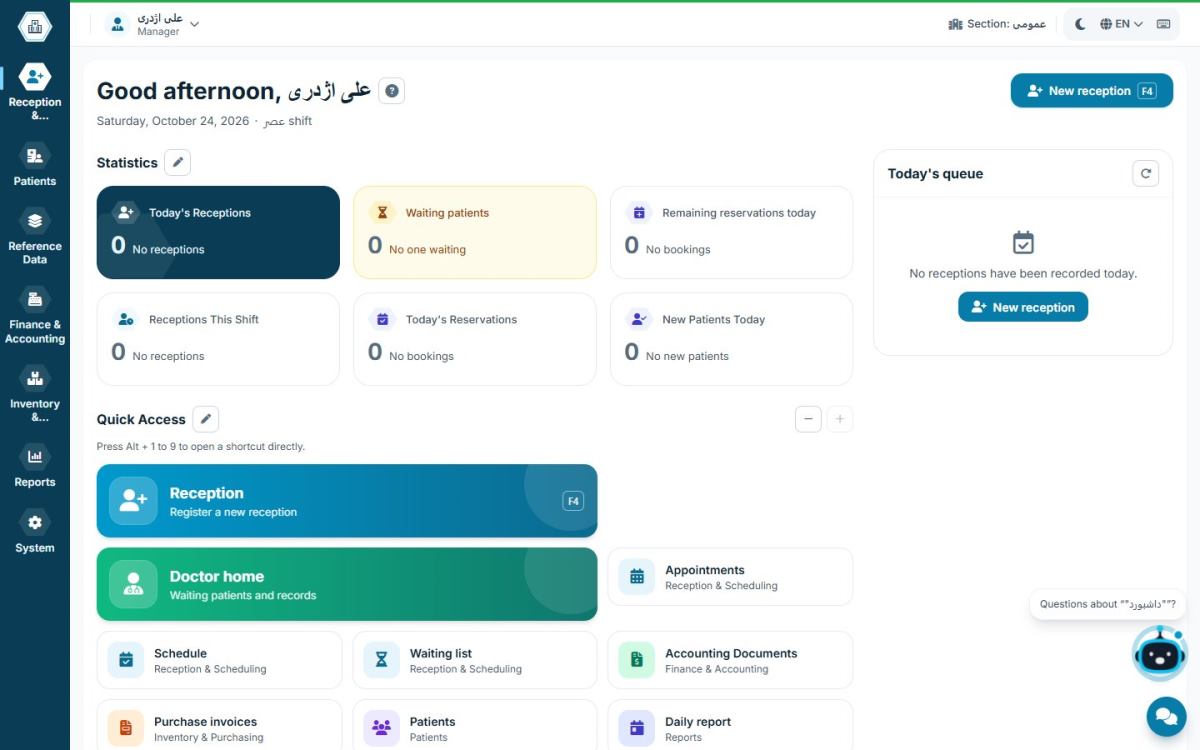
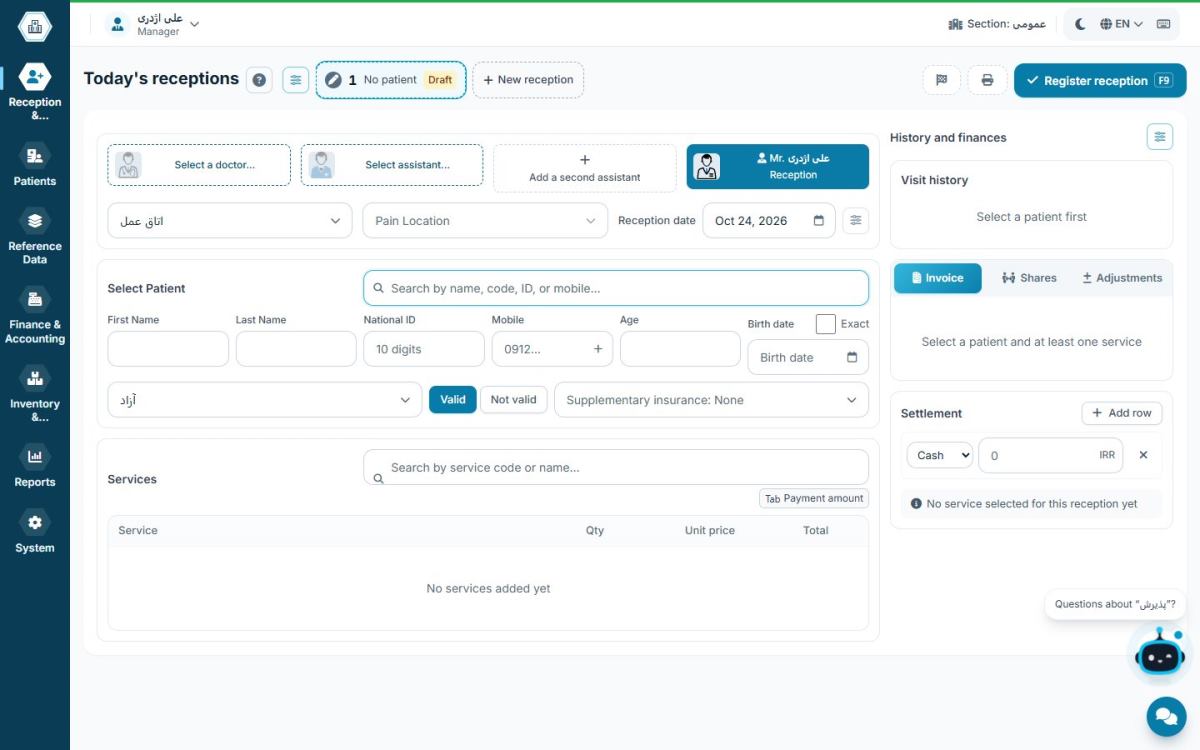
- Reception and invoicing: register the patient, choose the doctor and service, calculate the fee and settle the bill.
- Appointments and waiting list: book visits, send reminders and keep the queue in sync between front desk and doctor.
- Patient records: visit history, diagnoses, medications, images and the doctor's notes.
- Accounting and cash: receipts and payments, cheques, expenses, payroll and each doctor's share.
- Inventory: stock of drugs and supplies, purchasing and low-stock alerts.
- Reports: daily and monthly reports, income per doctor and performance by department.
How is practice software different from clinic software?
Software for a single practice is built for one doctor and one or two receptionists, so it focuses on fast check-in and simplicity. Software for a clinic or polyclinic must handle several doctors, departments, work shifts and the split of income between doctors and partners. If you run a single practice today but plan to grow, pick a system that can scale from a practice to a large clinic without switching software. We cover this in more detail in managing a multi-doctor clinic.
Which criteria matter when choosing?
The most important criteria are receptionist speed, working on a local network without internet, patient data security, real support and transparent pricing. Good software should be fast with the keyboard, run on every computer in the practice at the same time and keep data on the practice's own server. The full list is in our checklist for choosing clinic software.
How clinic software changes a working day
Picture the start of a morning session. The receptionist opens the app and sees today's appointments, patients due for follow-up and the cash total from the previous shift on the dashboard. The first patient arrives; the receptionist finds them by typing a few letters of their name or mobile number, selects the service and doctor, and takes the payment. At that same moment the patient joins the doctor's waiting list and the payment is posted to the cash box.
In the consulting room, the doctor sees the waiting list, opens the patient's record and reviews previous visits, prescribed drugs and earlier notes without searching a filing cabinet. After the visit, the notes are saved to the record. At the end of the day the receptionist closes the cash box and the manager sees income by doctor and by service. None of this needs a paper ledger or manual calculation.
Who is clinic software for?
- GPs and specialists in private practice: gain the most from fast check-in, organised records and income reports.
- Practices with two or three doctors: need income splitting, a separate queue for each doctor and a shared cash box.
- Clinics and polyclinics: run several departments, shifts and partner shares; see the editions comparison.
- Dental practices: need multi-session treatment plans and instalment payments.
If your practice is still small, choose software that can grow later without replacing it or losing data.
Common mistakes when buying clinic software
- Choosing by feature list instead of daily speed: software with a hundred features but a slow check-in screen costs your receptionist time every single day.
- Ignoring offline work: if the internet goes down and reception stops, the queue grows fast. Compare both approaches in offline vs cloud clinic software.
- Not asking about data ownership and export: always ask how you would get your patient data back if you ever change systems.
- Overlooking support: clinic software is used every day; slow support means a stalled practice.
- Skipping receptionist training: even the best software is used poorly without training. Built-in help reduces this problem.
Moving from paper and spreadsheets to software
Don't start the switch on a busy day; a weekend or a quiet day is best. First define doctors, services and fees, then users and each person's access level. You don't need to import every old file on day one; register active patients at their next visit so records fill in over time. Keep the paper diary alongside the software for the first week so the receptionist works with confidence, then retire it.
What does Hamyarteb offer?
Hamyarteb is Windows software for managing medical practices and clinics, combining reception, scheduling, patient records, accounting and inventory in one application. It installs on the practice's local network, works without internet and gives you 500 free patient visits with every feature after sign-up; after that you can buy a visit-based or time-based plan.
See also: clinic management software pricing.
Frequently asked questions
Does a small practice need clinic management software?
Yes. Even in a single-doctor practice, structured reception and cash records reduce accounting errors and make finding a patient's history a matter of seconds.
Is clinic software hard to learn?
Good software uses familiar practice terminology and built-in help; a receptionist usually becomes comfortable with it within the first few days.
Where is patient data stored?
In offline software such as Hamyarteb, data is stored on the practice's own server, and the app includes tools for regular backups.
How long does installation take?
With Hamyarteb, a small installer sets up the application and database automatically, and the initial setup of doctors and services is usually done the same day.
Do I need a dedicated server?
No. One of the practice computers acts as the server and the other computers connect to it over the local network.